

Are you looking to streamline your data collection and processing tasks without breaking a sweat? In this digital age, automation is the key to boosting productivity and staying ahead of the competition. With the right tools, you can create powerful workflows that save you time and effort, allowing you to focus on what truly matters. In this step-by-step guide, we’ll show you how to harness the power of n8n and GraphQL APIs to automate your daily tasks and supercharge your workflow.
n8n is an open-source workflow automation platform designed for easy-to-use visual workflow creation, empowering users to build complex data collection and processing tasks without extensive coding skills. Its intuitive interface simplifies the configuration and monitoring of workflows, while a vast selection of pre-built nodes enables seamless integration with popular tools like Google Sheets, Slack, and Product Hunt. By leveraging GraphQL’s efficient data querying capabilities within n8n, you can create sophisticated automation tasks and integrate with various APIs and web services effortlessly.
In this article, we’ll introduce you to the world of GraphQL APIs and demonstrate how to use them in n8n to pull the top 5 daily posts from Product Hunt. We’ll walk you through the process step-by-step, providing clear instructions and visuals to help you create your own workflow. By the end of this guide, you’ll have a solid understanding of how to use GraphQL APIs in n8n and be well-equipped to automate a wide range of tasks. So, let’s dive in and unlock the true potential of n8n and GraphQL!
GraphQL & n8n – Getting Started
Introduction to GraphQL
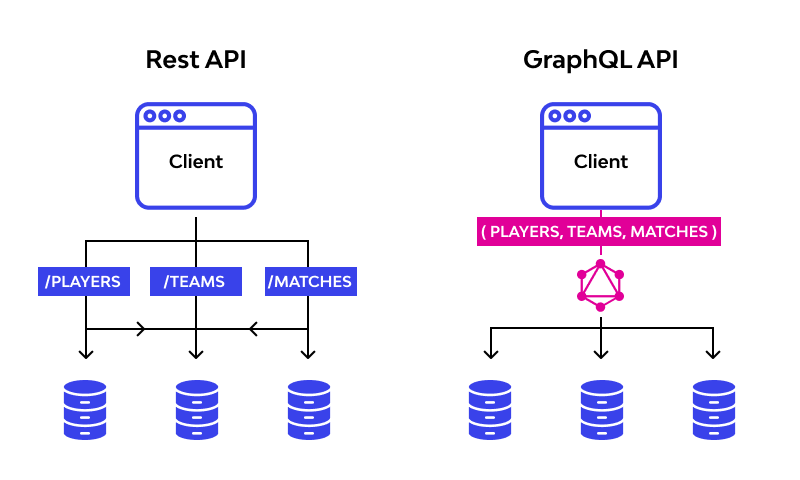
GraphQL is an open-source query language and runtime for APIs, developed by Facebook in 2012. It allows developers to request and receive specific data from APIs, making it more efficient and flexible than traditional REST APIs.
With GraphQL, you can fetch data from multiple sources in a single request, reducing the number of API calls and improving app performance. Its schema-based design also ensures better documentation and stronger validation, making it easier for developers to work with complex data structures.
Introduction to n8n
n8n is an open-source workflow automation platform designed for easy-to-use visual workflow creation, empowering users to build complex data collection and processing tasks without extensive coding skills.
Its intuitive interface simplifies the configuration and monitoring of workflows, while a vast selection of pre-built nodes enables seamless integration with popular tools like Google Sheets, Slack, and Product Hunt.
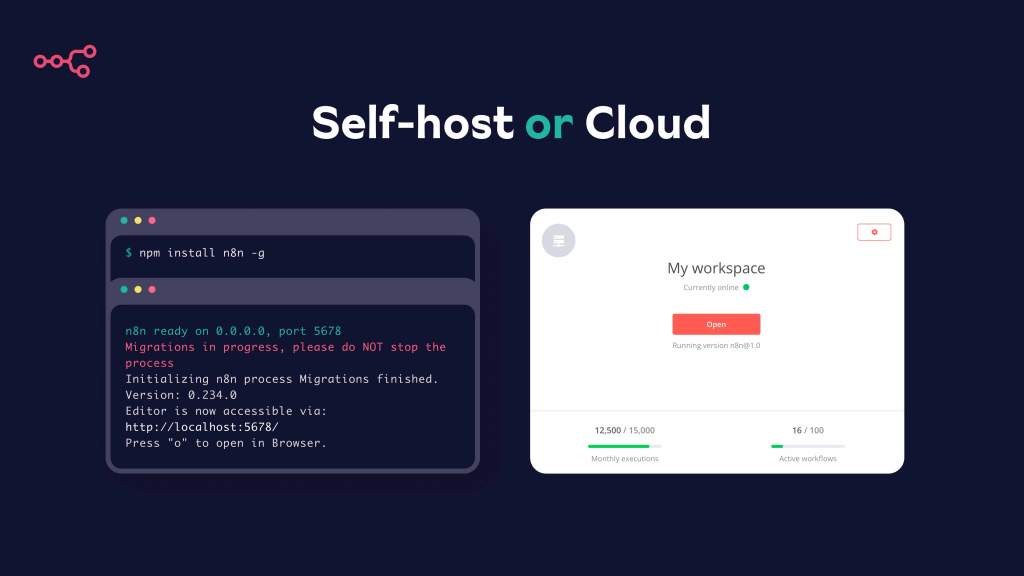
With n8n cloud, you can enjoy a managed, scalable solution that eliminates self-hosting hassles, provides enhanced security features, consistent updates, and dedicated support, making it effortless to integrate multiple systems and boost your efficiency.
The combination of n8n and GraphQL offers a powerful solution for automating data collection and processing tasks. By leveraging GraphQL’s efficient data querying capabilities within n8n’s intuitive visual workflow builder, users can create sophisticated automation tasks without extensive coding skills.
This powerful duo enables seamless integration with various APIs and web services, making it easier than ever to collect, process, and transfer data between multiple systems. Let’s explore how n8n’s user-friendly interface and versatile integrations make it the perfect tool for working with GraphQL APIs.
Automating ProductHunt via their GraphQL API
Introduction to the Workflow
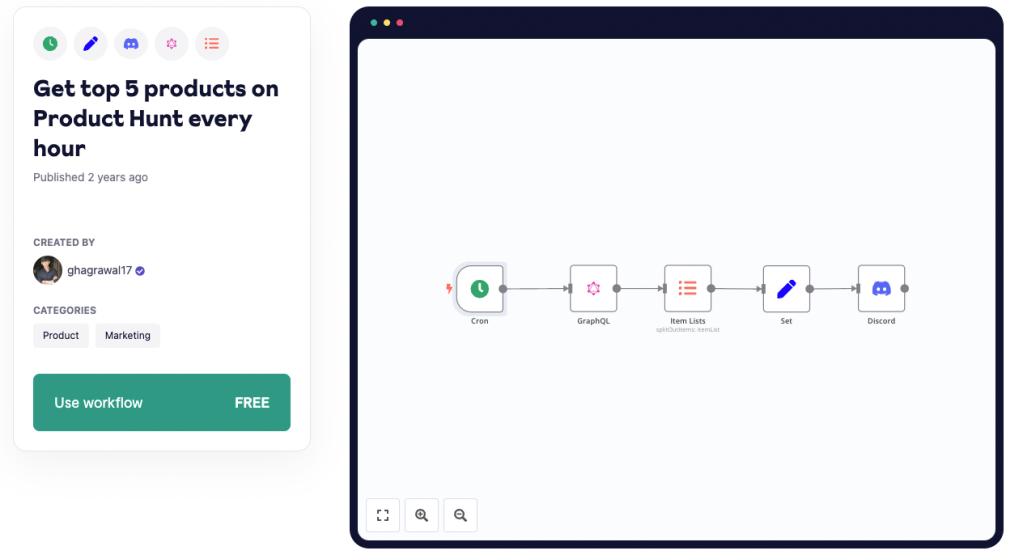
In this example, we’ll showcase a powerful workflow that combines the capabilities of n8n and GraphQL APIs to fetch the top 5 daily posts from Product Hunt and share them on a Discord server. This workflow demonstrates how to leverage GraphQL APIs within n8n and automate data collection and sharing tasks effortlessly.
Getting Started with the n8n Community Template
You do not have to build this template from scratch again. You can access it via the n8n community template library via this link.
You can copy it to clipboard via the JSON “code” n8n workflows are written in, or directly import it into your n8n cloud account.
If you don’t have a n8n cloud account yet, you can set one up for free in just a few minutes.
Configuring the Cron Node
The first node in this workflow is the Cron node, which triggers the workflow at specified intervals. By default, the workflow is set to run every hour. To adjust the trigger time, click on the Cron node and update the Trigger Times.
If you want to have a deep dive into how to run workflows “On Schedule” you can read more about it in our advanced guide about it.
Setting Up the GraphQL Node
The GraphQL node is responsible for making the API call to the Product Hunt GraphQL API to fetch the top 5 daily posts. To configure the node, click on it and input your Product Hunt API token in the “Authorization” field. You can obtain the API token by creating a Product Hunt account and following the instructions in their API documentation.
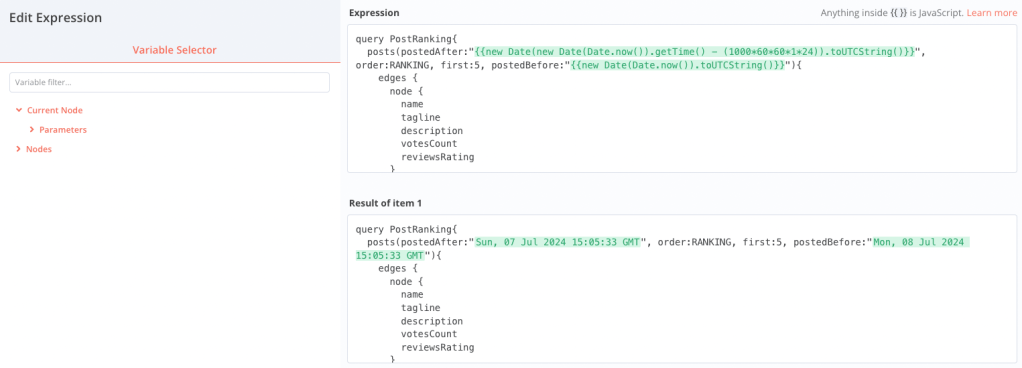
The query is already written for you in the “Query” field. If you want to adjust it, you can do it as you want. For example could you change the number of posts retrieved to 10 by changing “first:5” to “first:10” or pull additional parameters.
The default query retrieves the top 5 daily posts sorted by votes count in descending order. After inputting the query, click “Execute Query” to test the API call. If successful, you should see the requested data displayed in the “Response” field.
Transforming Data with the Item Lists Node
The Item Lists node is used to transform the single item returned by the GraphQL node into multiple items, allowing the workflow to process each post individually.
Filtering Data with the Set Node
The Set node is used to return only the name, description, and votes of each product, making it easier to work with the data in subsequent nodes.
Sharing Data on Discord with the Discord Node
The Discord node is responsible for sending the top 5 daily Product Hunt posts to a specified Discord server. To configure the node, click on it and follow these steps:
- Create a new Discord Webhook by going to your Discord server’s settings, selecting “Integrations,” and clicking on “Webhooks.” Give your webhook a name and choose a channel for the messages to be sent to, then click “Copy Webhook URL.”
- In the n8n Discord node, paste the copied Webhook URL into the “Webhook URL” field.
Testing and Optimizing the Workflow
Before activating the workflow, it’s essential to test it to ensure it functions as expected. To test the workflow, click on the “Execute Workflow” button at the top of the n8n editor. This action will trigger the workflow, and you should see the top 5 daily Product Hunt posts appear in your specified Discord channel.
If the workflow doesn’t run as expected, review the configuration of each node and make any necessary adjustments. Once the workflow is functioning correctly, you can optimize it further by customizing the Cron node’s schedule or modifying the GraphQL query to fetch different data.
Conclusion
In conclusion, this step-by-step guide has demonstrated the power of combining n8n and GraphQL APIs to automate data collection and sharing tasks, such as fetching the top 5 daily Product Hunt posts and sharing them on Discord. By leveraging n8n’s intuitive visual workflow builder and GraphQL’s efficient data querying capabilities, you can create sophisticated automation tasks without extensive coding skills.
As you continue to explore the possibilities of n8n and GraphQL, we encourage you to experiment with different APIs, nodes, and workflows to optimize your automation processes further. Our blog offers a wealth of resources, tutorials, and examples to help you unlock the full potential of n8n and enhance your productivity.
To stay up-to-date with the latest n8n tips, tricks, and best practices, be sure to subscribe to our blog and follow us on social media. By doing so, you’ll gain access to valuable insights and guidance that will help you make the most of your n8n experience. Happy automating!


 Master Automation with n8n - n8n-automation.com
Leave a comment