
In the whirlwind of today’s digital age, efficiency reigns supreme. If you’re a Notion user looking to optimize your workflows, you’re about to discover some transformative possibilities. Through this article, we’ll explore potent automations using n8n cloud that will not only save you precious time but also elevate your Notion experience to the next level.
We’ll delve into five crucial automations that can revolutionize the way you manage your projects, tasks, and data. From seamless project management to enhanced data synchronization, these n8n templates are crafted for simplicity and effectiveness. To make implementation a breeze, we’ll include direct links to each automation template, so you can start automating in just a few clicks.
Regardless of whether you’re a Notion veteran or new to the world of automation, these n8n workflows will help you unlock the full potential of your tools, allowing you to focus on what’s most important—achieving your goals.
Get ready as we unpack these game-changing automations and elevate your Notion productivity to new heights!
Exploring Notion: The Ultimate Workspace Tool

Notion is an all-encompassing workspace tool designed to streamline personal and team workflows. Since its inception, Notion has offered a flexible platform that combines note-taking, project management, database management, and more, all under one roof.
With Notion, users can create dynamic pages and databases to organize tasks, track projects, manage knowledge, and collaborate efficiently. Its versatility and integration capabilities make Notion a favorite among individuals and teams seeking a cohesive workspace solution. From detailed project plans to dynamic to-do lists, Notion equips you with everything needed to manage and optimize your productivity effectively.
Discover n8n: The Dynamic Automation Platform for Integrated Workflows
n8n is an open-source automation platform that empowers you to link various apps and services, creating fluent workflows without the need for coding expertise.
Thanks to its user-friendly interface, n8n allows you to build sophisticated automations using a vast selection of pre-built nodes for popular tools like Google Sheets, Slack, and naturally, Notion.
With the advent of n8n cloud, this flexibility is expanded even more, providing a managed, scalable solution that eliminates the hassle of self-hosting. The n8n cloud boasts enhanced security features, consistent updates, and dedicated support, making it simpler than ever to integrate multiple systems and boost your efficiency.
The Best n8n Notion Automations – Top 5 List
Transcribe Audio Files, Summarize with GPT-4, and Store in Notion
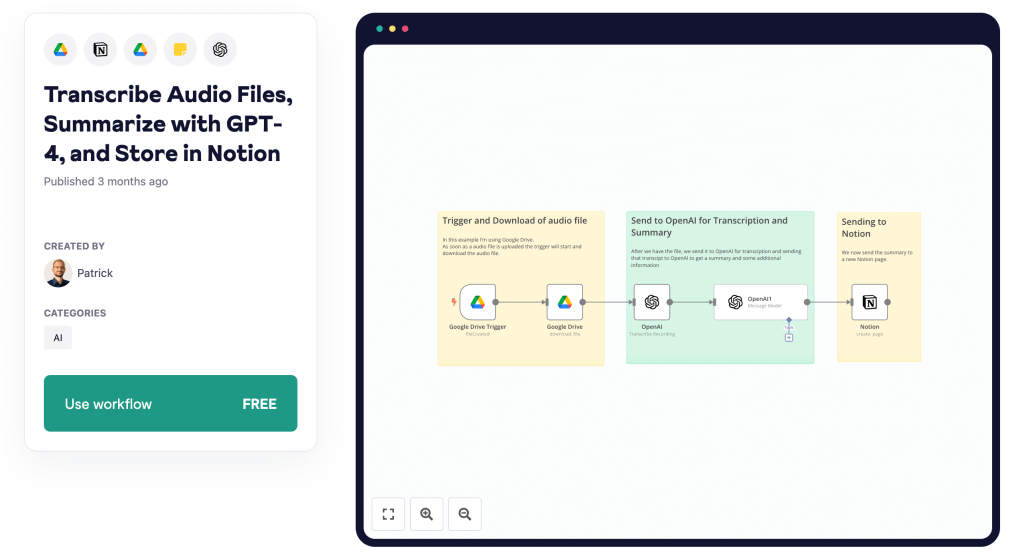
This workflow is ideal for content creators, researchers, and students who need to efficiently transcribe and summarize audio files.
By automating the transcription with OpenAI’s Whisper API and summarization with GPT-4, it eliminates the tedious manual effort and ensures precise, concise outputs stored in Notion.
Start saving time and enhancing your productivity by downloading and using this template now.
Notion and Asana – Automatic Sync

Efficiently sync data between Notion and Asana with this workflow template.
Whenever a new task is created or updated in either app, the changes are automatically reflected in the other, streamlining your task management.
Simplify your project coordination by downloading and using this template today.
Notion and Slack – Message based on To Do Database
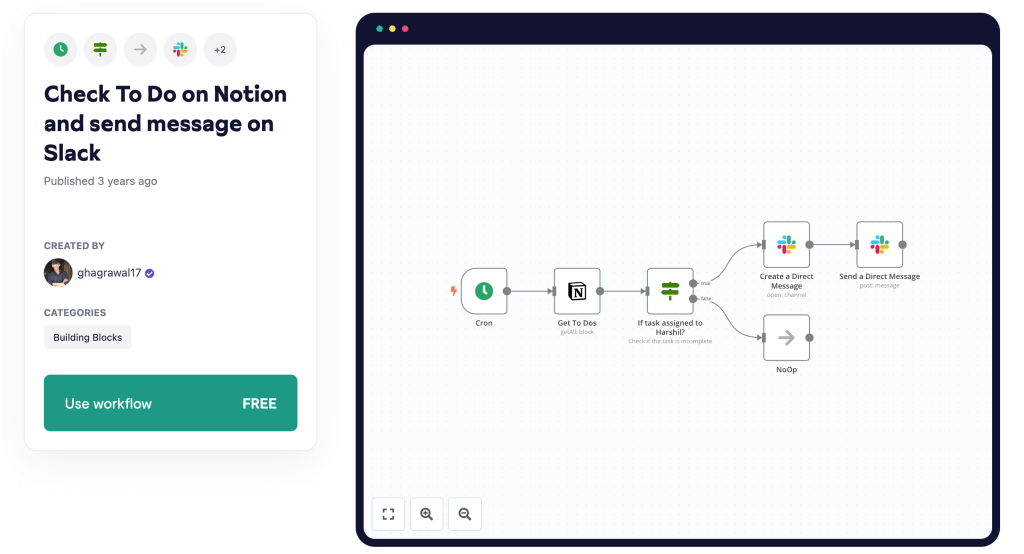
Stay on top of your tasks with this automated workflow that checks your Notion To-Do list and sends the tasks to Slack.
Triggered daily, it fetches tasks from Notion, checks assignments, and sends direct messages on Slack, ensuring you never miss a task.
Enhance your task management by downloading and using this template now.
Notion and Outlook – Sync Events

Keep your calendars in sync with this workflow that automates syncing Outlook Calendar events to a Notion database.
It schedules intervals to check for new or updated events within a year, adding or updating them in Notion with the event details and links.
Streamline your event management by downloading and using this template now.
Notion and Todoist – Sync To Do’s

Effortlessly sync tasks between Todoist and Notion with this workflow.
When tasks in Todoist are labeled “send-to-n8n,” they are identified and a new database page is created in Notion with the same task details.
Simplify your task management by downloading and using this template today.
Conclusion
Unlocking the full potential of Notion becomes effortless with the power of n8n automations. By integrating and automating various aspects of your workflow, you not only save precious time but also ensure seamless productivity. From syncing tasks across platforms to automating transcription and summarization, the possibilities are endless.
Whether you’re a content creator, researcher, student, or a professional juggling multiple projects, these n8n templates provide robust solutions tailored to your needs. Each workflow described here is designed to streamline your processes and minimize manual effort, allowing you to focus on what truly matters—achieving your goals.
So why wait? Elevate your Notion experience and take control of your productivity today. Explore these powerful n8n automations and start transforming your workflows!
Don’t forget to download and implement these templates to experience the remarkable difference automation can make in your daily operations. Happy automating!


 Master Automation with n8n - n8n-automation.com
Leave a comment