
Are you constantly looking to streamline your SecOps tasks? Interested in the power of automation? Then you’ve landed at the right spot with this article. Today, we’re introducing the top 5 SecOps automations that are designed to reinforce security frameworks or simplify data extraction for threat analysis.
To ensure the integration process of these automations into your workflow is as fluid as possible, today we will be focusing on automations that were constructed on the robust foundation of the automation platform – n8n.
These are readily accessible through its vibrant community template library. So whenever an automation workflow piques your interest, you can simply download the corresponding template through the provided link and get started.
Why n8n and its community make it easy for you to automate your SecOps workflows

n8n is a modular automation platform, available as a free open-source version or in the cloud via n8n’s own website. With n8n, even non-developers can build advanced automation (for example SecOps) and simplify many processes.
In addition, n8n has a large community of people who make their own developed templates available to the community. And that’s why it’s the best automation platform to get started quickly and at the same time have almost unlimited possibilities on how to further develop your automations.
You can either copy the templates we are about to present as JSON and transfer them to your open-source self-hosted workspace, or you can test n8n cloud and easily upload the templates directly to your workspace. You can easily test n8n cloud free of charge for 14 days.
The Best n8n SecOps Automations
Analyze emails with S1EM

Today, cyber attacks are more numerous and cause damage in companies. Nevertheless, many software products exist to detect cyber threats. The S1EM solution is based on the principle of bringing together the best products in their field, free of charge, and making them quickly interoperable.
S1EM is a SIEM with SIRP and Threat Intel, a full packet capture, all in one. This template is built by the creator of S1EM and you can use it via this link.
URL and IP lookups through Greynoise and VirusTotal
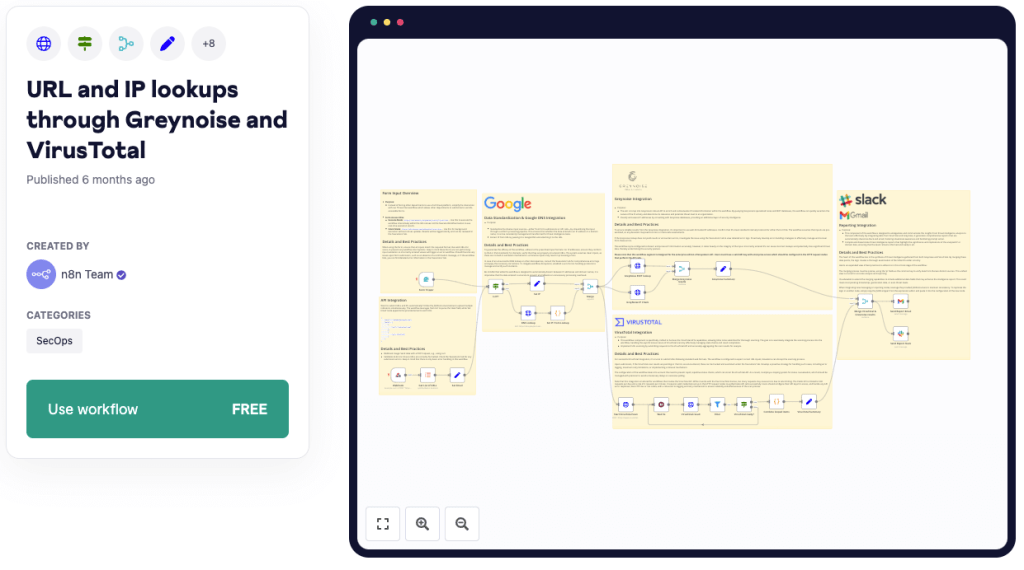
Leverage the n8n workflow as a potent cybersecurity tool that enables URL or IP lookups using premier threat intelligence vendors.
This SecOps automation enhances analysis accuracy by checking obtained IP addresses via GreyNoise services, additionally triggering a VirusTotal scan to identify any malicious properties.
With capabilities of delivering a detailed analysis including classification, IP location, activity tags, and an overall security vendor analysis via email or Slack, this workflow necessitates accurate configuration of triggers, correct API credentials, and mindfulness of data volume and API rate limits for optimal performance.
You can use it via this link.
Phishing Analysis – URLScan.io and VirusTotal

Utilize this n8n workflow to bolster cybersecurity by automating the analysis of emails via Microsoft Outlook for potential indicators of compromise (IOCs), specifically suspicious URLs.
The process sequentially processes emails, marking them as read while simultaneously scanning each URL using URLScan.io and VirusTotal services.
Take note of potential setup challenges including configuration of the Outlook node to retrieve unread messages, error handling, and proper integration of API keys, all to ensure accurate identification and subsequent reporting of potential IOCs to the designated Slack channel.
You can use it via this link.
Authenticate a user in a workflow with OpenID connect

This workflow needs a user to authenticate by using an openid connect provider in order to call the webhook.
If the user is not authenticated, it starts a login process by using an Authorization Code with PKCE https://datatracker.ietf.org/doc/html/rfc7636, a standard way to authenticate users with openid connect.
Then, after the user logs in, the webhook is refreshed and gets the user’s token from a cookie. With this token, all details about the user are requested through the userinfo endpoint on the identity provider.
You can use it via this link.
Analyze Email Headers for IPs and Spoofing
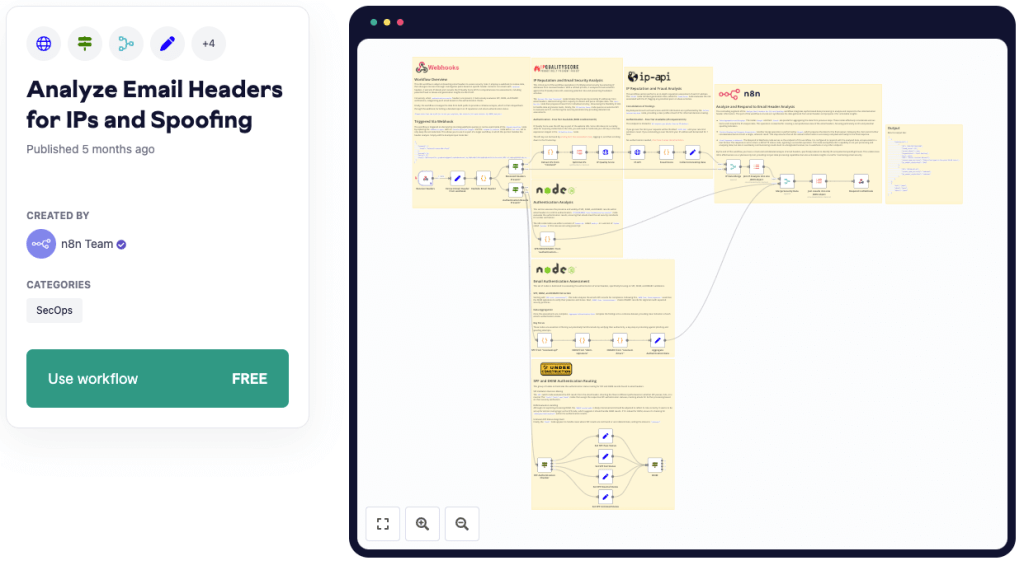
This n8n workflow aids in scrutinizing email headers via a webhook, branching into two main paths based on the presence of ‘received’ and ‘authentication results’ headers.
The workflow retrieves IP addresses from headers and fetches data, including fraud score and abuse history via IP Quality Score API alongside geolocation data from IP-API. On the other path, authentication results are extracted and evaluated for SPF, DKIM, and DMARC, merging both paths later to send a collective analysis.
Be watchful of potential setup challenges like correct webhook configuration, proper integration of API keys, accurate logic node handling, and comprehensive testing for various email header formats.
You can use it via this link.
We hope you had fun exploring n8n and the possibilities of AI automation. On n8n-automation you can find a lot more tutorials about how to automate workflows with AI and how to get started with n8n.


 Master Automation with n8n - n8n-automation.com
Leave a comment