
Discover how you can streamline your customer service operations by integrating two powerful tools: Asana for project management and WhatsApp Business Cloud for communication.
Follow our step-by-step guide on setting up automatic confirmation of incoming messages, creating support tickets in Asana and all of that leveraging the powerful automation platform n8n and its community templates.
At the end you will also learn how to tailor these features to your specific needs for efficient and improved customer satisfaction. Have fun at the start of your automation journey!
Asana for Project Management
Asana is an advanced project management tool designed to help teams organize, manage, and track their work tasks and projects with maximum efficiency.
In customer service, it can be used to assign and manage customer inquiries, track customer interactions, and systematically handle complaint resolution, thereby ensuring no customer issue is overlooked and all tasks are completed in a timely manner.
WhatsApp Business Cloud for Communication
WhatsApp Business Cloud is a professional version of the popular messaging app, specifically designed for small to medium businesses to communicate effectively with their customers.
It serves as a solid platform for customer service where businesses can quickly respond to client inquiries, send out automated messages, provide real-time support, and manage customer interactions on a massive scale, all leading to improved customer satisfaction.
Using n8n For Workflow Automation
To build our automation we use the software n8n. n8n is an open-source workflow automation software that is also available as a cloud version on the website of n8n in a free trial period.
It makes it super easy for anyone, with or without special technical knowledge, to build automations.
If you have never had any contact with n8n, you can get an overview of how to get started with n8n here.
The Workflow
In today’s workflow, we want to automate part of our customer service, namely the automatic confirmation of incoming messages via WhatsApp and the creation of support tickets in Asana.
Using Templates with n8n
The advantage of n8n as our automation platform is that, thanks to the large and active community, you can find templates for all kinds of automation that are made available to you by community members.
You can often load these into your workspace free of charge. This is also the case with today’s template, which we have created for you and you can simply download via this link.
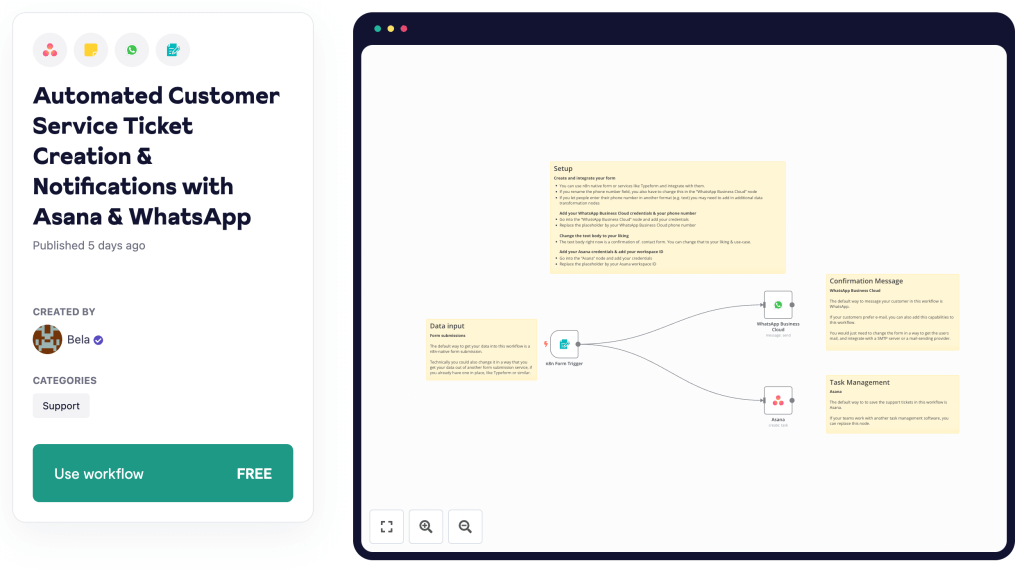
If you copy the template into your workspace, you can simply follow the tutorial to understand exactly what you need to set up and how the workflow works in detail, but you don’t have to recreate the entire workflow on your own.
Setup
To be able to use the workflow from the template you have to do a few setup steps. The most important are the following:
- You need to add your credentials to the WhatsApp Business Cloud node.
- You need to add your credentials to the Asana node.
- Replace the placeholders with the correct phone number, ID, etc. in both of the nodes.
Data Input
The default way to get your data into this workflow is a n8n-native form submission. You can also change it in a way that you get your data out of another form submission service, if you already have one in place, like Typeform or similar.
Confirmation Message
Once you have entered your customer’s contact details via the form, this node sends an automated WhatsApp message to the number they entered in the form to confirm the support request.
You can change the confirmation message in the WhatsApp Business Cloud node in a way that it serves you.
Task Creation
The default way to to save the support tickets in this workflow is Asana. If your teams work with another task management software, you can easily replace this node.
In the template, the workflow adds a note to the ticket that contains your user’s comment. You can customize this. If you also want to assign the ticket directly to someone, you can also do this very easily.
Let Your Automation Journey Begin!
We hope this tutorial has helped you to take your first steps with n8n. On our site you will find many more guides to the automation platform n8n such as an overview of the LangChain integration or a Get Started Guide for the cloud version.


 Master Automation with n8n - n8n-automation.com
Leave a comment