

Step into the world of automation with n8n, your user-friendly tool designed for everyone, from tech experts to absolute beginners. It’s more than a tool, it’s your gateway to effortlessly accessing and leveraging data via REST API endpoints.
This tutorial guides you through using the weather API from Brightsky, showcasing how to fetch and utilize location-based weather data. Greater insights, including dynamic workflow creation with n8n, await in upcoming articles. Start your journey through data automation today!
What is n8n?
n8n is a robust, no-code workflow automation tool, developed to ease both tech-savvy and non-tech users into setting up their own automated systems.
Its main strength comes from allowing seamless integration of various online services – all without requiring any coding knowledge. By simplifying workflow management and connecting disparate applications, n8n serves as your gateway into efficient automation, effectively unlocking a world of productivity and operational ease.
Getting Started with n8n cloud – Free Trial

Even though n8n offers an open-source version that you can host yourself, we’ll keep things simple in this tutorial, utilizing the easy-to-use native cloud version. By creating an account on n8n.io, you can explore its robust capabilities during a risk-free 14-day trial period that doesn’t require a credit card.
Once your trial begins, you’ll find yourself in an empty workspace – your canvas for building personalized workflows. But before we jump into constructing workflows in this space, let’s take a brief detour to understand the workings of REST APIs.

What is a REST API?
As we navigate the world of workflow automation, a crucial element you’ll come across is REST APIs. REST, short for Representational State Transfer, is a globally recognized standard employed by developers to shape web services, with APIs (Application Programming Interfaces) serving as the bedrock that allows disparate software applications to interact and exchange data.
REST APIs operate over HTTP (Hypertext Transfer Protocol) – the foundation protocol of any data exchange on the Web. Underlying every data transaction, HTTP and REST together bestow upon APIs the power to drive dynamic web services.
These REST APIs are essentially gateways enabling distinct applications to communicate and share data effectively. They form the essence of digital interactions, powering actions from social media updates, live weather forecasts to online food orders.
With the efficiency of n8n, you can easily harness REST APIs without requiring any coding expertise. By calling APIs, retrieving essential data, and automating workflows using that data, you are embarking on a journey toward streamlined operations. This forms the beginning of our tutorial, where we will further explore how to employ n8n and a free Weather API to transform these theories into practical knowledge.
Diving Into n8n Rest API
The HTTP Node
Jumpstart your n8n journey by clicking on the ‘+’ symbol to ‘Add first Step’, and then typing ‘HTTP’ into the search field to bring up the ‘HTTP Request Node’.
Upon selecting this, you will notice that an n8n node is fundamentally made up of three key components – an Input (data), an Output (data), and the Node itself. In the context of our HTTP node, we are offered a variety of configurable options. Let’s briefly outline the primary ones before we delve into the details of API integration that we’ll be undertaking today.

Method: This option allows you to select the type of operation, like GET or POST, aligning with the standard functionality of an API endpoint. We’ll use the GET method for our purpose, which is extracting information.
URL: Provide the URL for the API call here. Usually, this URL is supplied by the REST API provider.
Authentication: Some APIs, especially paid ones, require user authentication for added security. In this tutorial, we’re skipping this step, as we use an API without authorization.
Let’s move ahead getting to know the API we will use today.
Brightsky.dev – An open-source Weather API
The Brightsky API is a powerful, free-to-use RESTful weather API that offers comprehensive weather data. From current weather conditions, forecasts, to historical data, Brightsky provides a wealth of meteorological information sourced directly from Germany’s national meteorological service, the Deutscher Wetterdienst.
This API is unique in its ability to give accurate weather predictions at hourly intervals and has the added advantage of being accessible worldwide. With Brightsky API, you can truly have a detailed and precise understanding of the weather at your fingertips. For our tutorial, we’ll be harnessing the power of this API to showcase how n8n can be used to connect to and extract valuable data from API endpoints simply and efficiently.
To get the information we need to call the Brightsky API endpoints, we have to go to their technical documentation. As we will focus on the single use-case of retrieving the current weather, we will focus on this endpoint, but you could also hourly weather or alerts via their other endpoints.
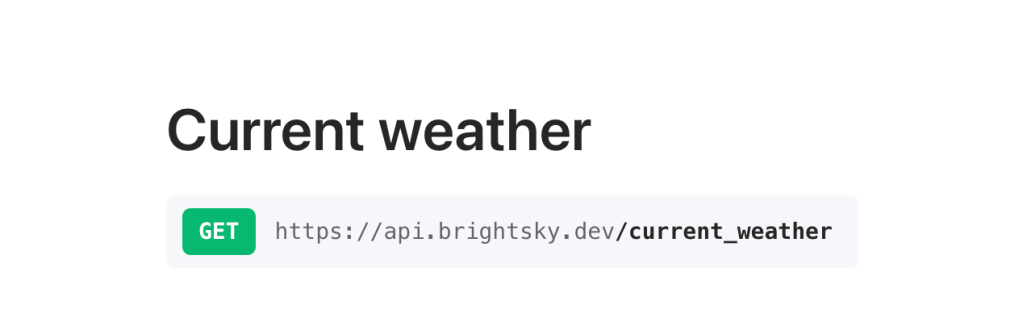
Copy the domain you can find for the Current weather endpoint in the documentation into the n8n HTTP Node URL field and set the Method to GET.
So that Brightsky knows for which location we want to know the current weather, we have to add parameters to our API call in addition to the method and the URL.
With Brightsky, we can use the Lat (Latitude) and Lon (Longitude) parameters to specify the exact location for which we want to receive data. To find out Latitude & Longitude for specific locations you can use the website LatLong.
Once you have found out the values for Lon & Lat, you must define them in the n8n HTTP Node under Parameters.

After you have entered the values, you can click on “Execute Node” and you will immediately see the result of your API call on the right-hand side under Output.
The Brightsky API gives you various values such as “condition”, “temperature” or with the value “wind_speed_30” the wind speed of the last 30 minutes.

Summary
Now you have learned how to make your first simple REST API requests using the no-code HTTP node from n8n.
So far, however, you have only scratched the surface of what is possible. In the next articles, we will use n8n’s workflow engine to send us this information by email at the same time every day.


 Master Automation with n8n - n8n-automation.com
Leave a comment